Home / Blog / Getting around
How to check MRT and LRT platform crowds before you leave
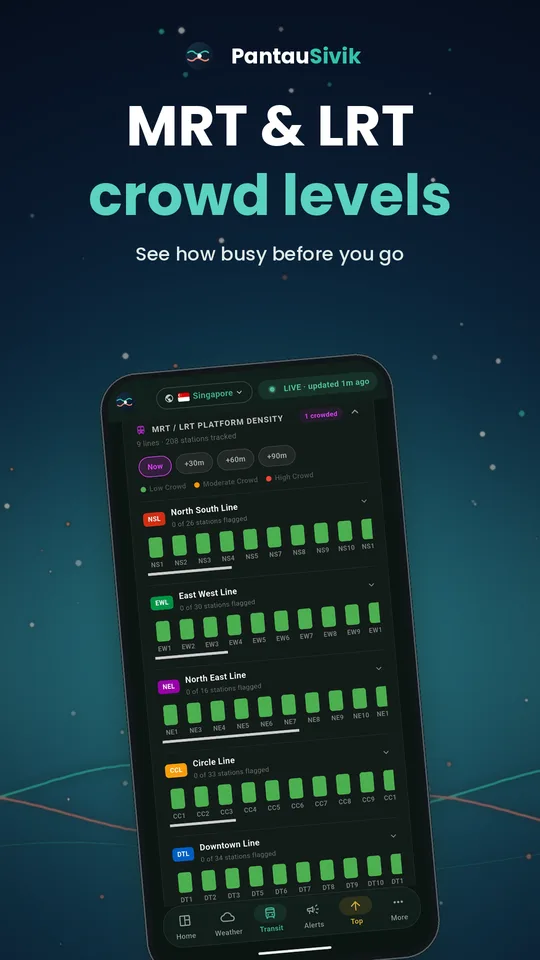
A crowded platform can add stress and minutes to a journey. PantauSivik shows platform crowd levels for MRT and LRT lines, so you can plan around the squeeze instead of walking into it.
In short: open Transit and look at the MRT and LRT platform crowd section. Green is quiet, orange is moderate and red is crowded. Use Now, +30, +60 and +90 minutes to see whether a short wait gets you a calmer platform.
Reading the crowd view
Open the Transit page and scroll to the MRT and LRT platform density section. Each line is shown in its usual colour, with a bar for every station coloured by how crowded the platform is, from low crowd through moderate crowd to high crowd. MRT and LRT are both included, and the LRT lines are grouped separately.
Where the numbers come from
The levels come from the Land Transport Authority's platform crowd data, shown per line. They are estimates, not a head count, and stations that are not yet open do not appear. Platform crowds are a Singapore feature.
Look ahead, not just now
Switch between Now, +30, +60 and +90 minutes to see how crowds are forecast to change. The forecast is also from the Land Transport Authority and comes in half hour steps, so PantauSivik shows the forecast closest to the time you pick. Overnight there is a gap of about four and a half hours when no forecast is published, and the app then says No forecast available instead of showing old numbers.
The headline count
The Transit card at the top shows how many MRT and LRT platforms are crowded right now. Since version 1.25.29 the count includes platforms with Moderate crowding as well as High, so the number matches the list below it.
An example
This is an illustration, not real data. It is 6 PM and your station is orange. You switch to +30 and it shows green. A short errand or a coffee might get you a calmer platform than leaving now. If +30 and +60 are both red, think about boarding a station earlier or later on the line, or taking a bus for part of the trip. The Trip Planner can compare the options.
Pair it with live bus arrivals
If you reach the station by bus, check the arrival times for your stop first, then check the platform crowd at your station. Together they tell you when to leave and which option is less crowded. See the bus arrivals guide.
When it helps most
- Before you leave home, the office or a mall, so you can pick your moment.
- At interchanges, where you can compare lines and pick the calmer option.
- After a train fault. If a line has a fault, crowds usually follow, so check Public Alerts as well.
- When roads are closed. More people may switch to the train. See night road closures and bus diversions.
What it cannot tell you
It shows the platform, not how full the train will be, and it cannot promise that a green platform stays green. Treat it as a guide and use your own judgement on the day.
Quick tips
- Check before you leave, not when you arrive.
- At interchanges, compare lines and pick the calmer option.
- Use Now against +30 to decide whether waiting a little is worth it.
- Save your regular bus stops for one-tap access.
Common questions
What do the MRT and LRT crowd colours mean?
Green means a quiet platform, orange means moderate and red means crowded.
Can I see platform crowds in advance?
Yes. Switch between Now, +30, +60 and +90 minutes to see how crowds are forecast to change.
Why is there no forecast late at night?
There is a gap of several hours overnight when no forecast is published. PantauSivik then shows a No forecast available notice instead of old numbers.
Does it include the LRT?
Yes. MRT and LRT platforms are both shown, with LRT lines grouped separately.
Is platform crowd information available in Malaysia?
No. Platform crowds are a Singapore feature.
Sources: Land Transport Authority platform crowd data as shown in PantauSivik, version 1.31.0. Crowd levels are estimates based on public data. Actual conditions may differ.
See also: Are buses really crowded?, MRT and LRT crowds guide, Changi Airport to the city, Deepavali weekend in Little India, MRT crowds: when and where.